IVFCRYO
Client work · Fertility logisticsFive parties working from one shipment record.
Shipping fertility specimens means coordinating a patient, two clinics, a courier, and IVFCRYO. I designed and built the shared interface that helps everyone confirm readiness before a shipment moves.
- My role
- Product design and front end
- Owned
- Research, workflows, components
- Partnered on
- Rails backend and tracking
- 75%
- fewer support calls
- 55%
- fewer shipping errors
Project summary.
Interviews with the owner, the COO, and the office manager showed the hard part wasn't the drive. It was getting five people, the patient, two clinics, a courier, and IVFCRYO, all confirmed and ready before a shipment could start.
- The decision
- I chose one shared record instead of two separate apps, so a shipment could never show one status to the patient and a different one to staff.
- The result
- Support calls dropped 75%, and shipping errors dropped 55%, once patients could see for themselves that both clinics had signed off.
Alternatives, implementation, and lessons
Scope
- Design · owned
-
- Stakeholder research & synthesis
- Five-party workflow modeling
- Information architecture
- Customer, staff, and public tracking views
- Readiness check before scheduling
- Front end · owned
-
- Accessible component system
- Progressive enhancement
- Forms that help people fix mistakes
- Status shown with text and icons, not color alone
- Backend · partnered
-
- Shaped the Rails domain model
- Specced lifecycle + readiness states
- Defined integration boundaries
- Set telemetry + alert requirements
Mapping who handles a shipment
Before drawing a single screen, I mapped how a shipment actually moves: a fragile, temperature-controlled package changing hands across two clinics and a courier, on a tight medical deadline. A wrong label or a missed temperature drop isn't just an inconvenience here. It can mean losing someone's only remaining embryo.
Don, the owner, put it simply: a shipment "looks like one transaction to the patient, but it is actually a chain of separate responsibilities", the patient, two clinics, a courier, and IVFCRYO, each with its own paperwork and approvals. So I started by mapping what each party had to do and who they handed the shipment to next.
The five parties
-
Patient
Authorizes the transfer, provides identity and records, completes forms and payment. The app keeps them from having to coordinate two labs themselves.
-
Sending clinic
Identifies, prepares, and releases the specimens, and names a responsible lab contact, not the front desk.
-
Receiving clinic
Confirms intake requirements, staffs qualified people, inspects, and accepts the specimens into storage.
-
Dedicated courier
Carries the sealed unit directly between facilities, no unrelated stops, with acknowledged chain-of-custody handoffs.
-
IVFCRYO
Provides the shipping unit and IVFCRYO-Sense monitoring, coordinates the logistics, and holds the case together.
Chain of custody
-
Prepare & release
IVFCRYO ships the unit with an IVFCRYO-Sense tracker inside; the sending lab loads the specimens and a named contact releases them.
-
Courier pickup
A dedicated medical courier accepts custody from the named lab contact and hand-carries the sealed unit. Both sides confirm the handoff.
-
Delivery & inspection
The receiving lab inspects the unit and records a calibrated temperature at specimen-storage level before taking custody.
-
Accept & close
Qualified staff accept the specimens into storage and the record closes on acknowledgment. A delivery scan alone does not close it.
Handoffs break down when the next person does not know they are now responsible. "Sent" is not the same thing as "received and approved."
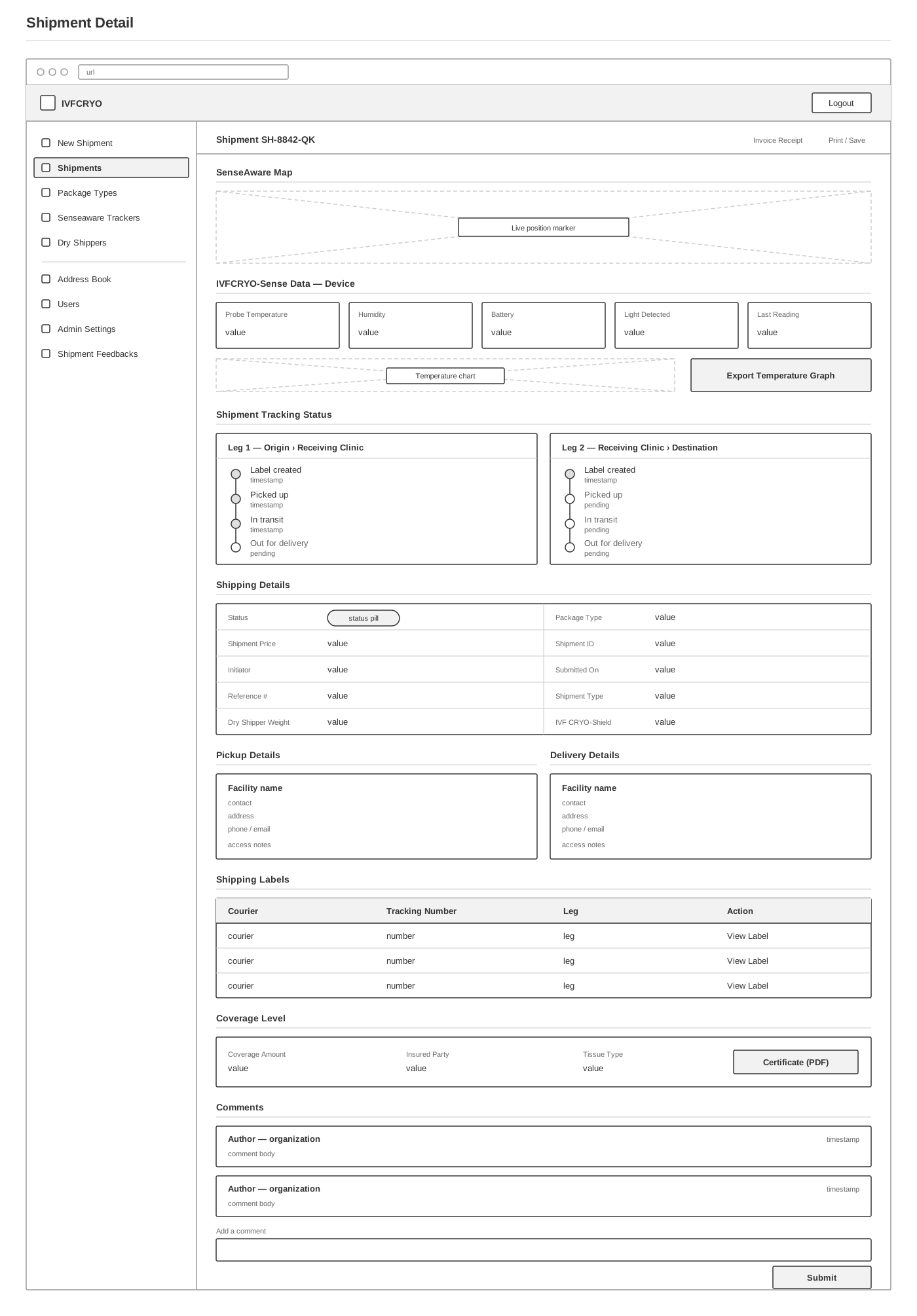
From sketch to annotated wireframe
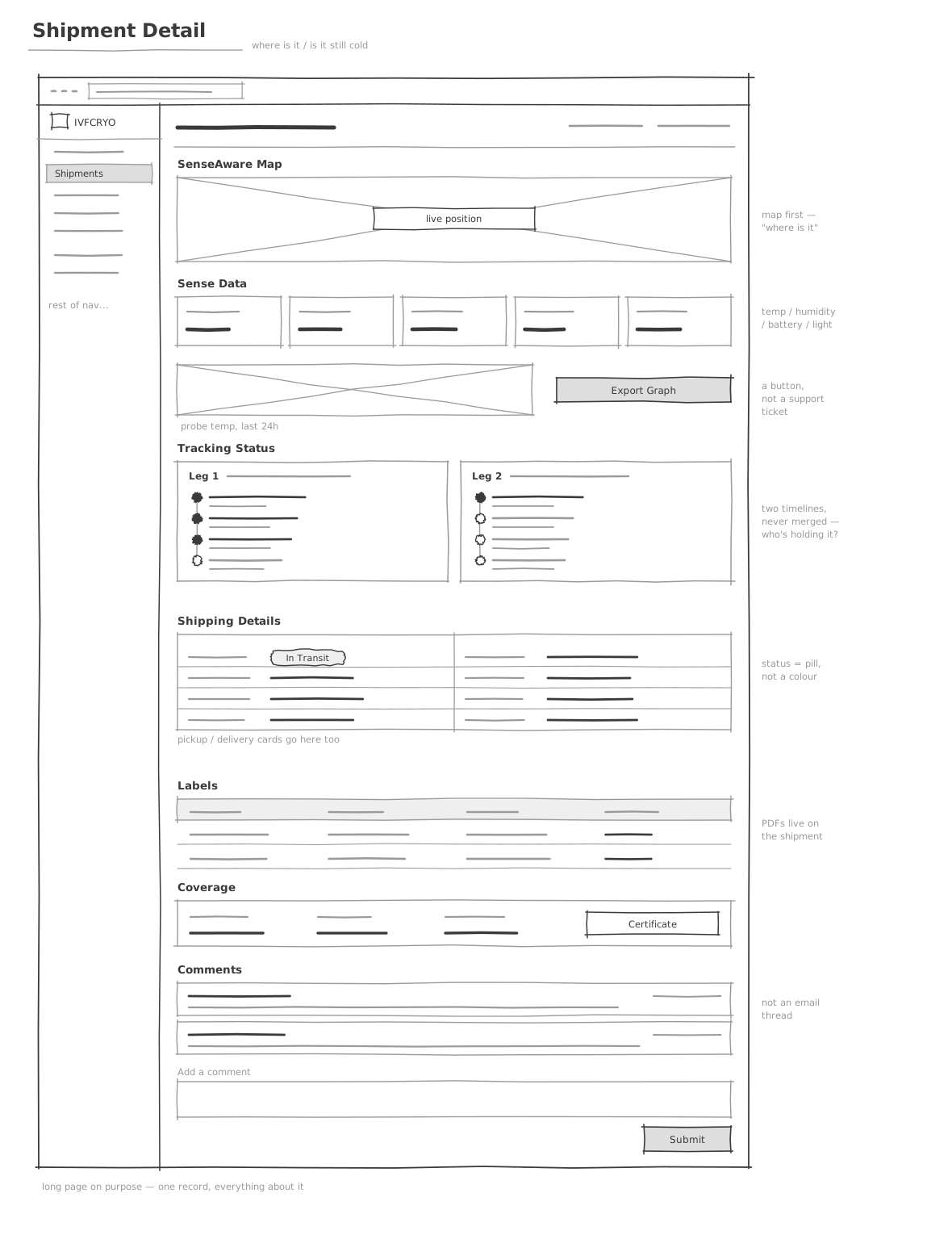
Sketch
Exploring the layout.
Wireframe
Defining the behavior.

Annotated
Documenting the decisions.

Shows where the shipment is and whether it is still at the right temperature.
Checking everyone is ready
I asked all three people I interviewed what they'd fix first, and all three named the same thing: a shared readiness check that both clinics confirm before a courier is scheduled.
The worst pattern, Daryl told me, is "scheduling first and hoping the remaining requirements are completed before pickup." It happens because someone is trying to protect a patient's transfer date, and it sometimes ends in a last-minute cancellation instead. So I made readiness a status the system checks. A requested date, a provisional plan, and a confirmed shipment stay three separate states, instead of all looking the same the way they did on paper.
Readiness checks before scheduling
- Patient Authorizations, identity, and payment complete
- Sending clinic Release approved, specimens prepared, contact named
- Receiving clinic Acceptance approved, intake requirements confirmed, staff scheduled
- Courier Route and timing confirmed as feasible
- Equipment Shipping unit available and suitable for the duration
Only once every checkpoint is confirmed does a shipment move from awaiting_readiness to ready, and only then can it be scheduled. This was the first thing I asked engineering to build, so a courier could never be sent before a clinic was actually ready.
It would not be enough for our team to mark a clinic as ready. The responsible person at each facility would confirm that the documents, staff, equipment, and timing are in place.
Why customers and staff share one app
A customer needs a short, reassuring path from request to tracking. The IVFCRYO staff member lives in the tool all day and needs to see every shipment and every client at once. Building two separate apps would have been simpler, but each would keep its own record of a shipment, and the two could drift apart and disagree, exactly the problem the app exists to fix.
Instead, both sides read from one shared shipment record. A readiness view now sits on the customer side too, since Sasha's hardest daily work was chasing "what are we still waiting for?" across email, fax, and clinic portals.
Customer and staff screens
Customer
-
Shipping list
Home. Active + past shipments, readiness + overdue alerts.
-
New shipment
Sender, receiver, specimen, live carrier pricing, CRYO Shield tier.
-
Readiness view
What each party still owes before it can be scheduled.
-
Active shipment
Read-only tracking and sensor telemetry.
-
Receiving customers
Saved delivery contacts.
-
Profile
Billing, address, cancel account.
Admin · IVFCRYO staff
-
Shipping list
Every active + past shipment across clients, by readiness state.
-
Active shipment
Edit, cancel, change status, notify, open an incident.
-
Customer list
Filter, sort, open a client.
-
Customer detail
All orders for one client.
-
Equipment inventory
Units, monitoring, maintenance and replacement flags.
-
Add customer
Creates the account, emails credentials.

The main workspace for staff, filtered first by readiness state.

Every failed step, such as a wrong verification code, offers a way to recover without calling support.
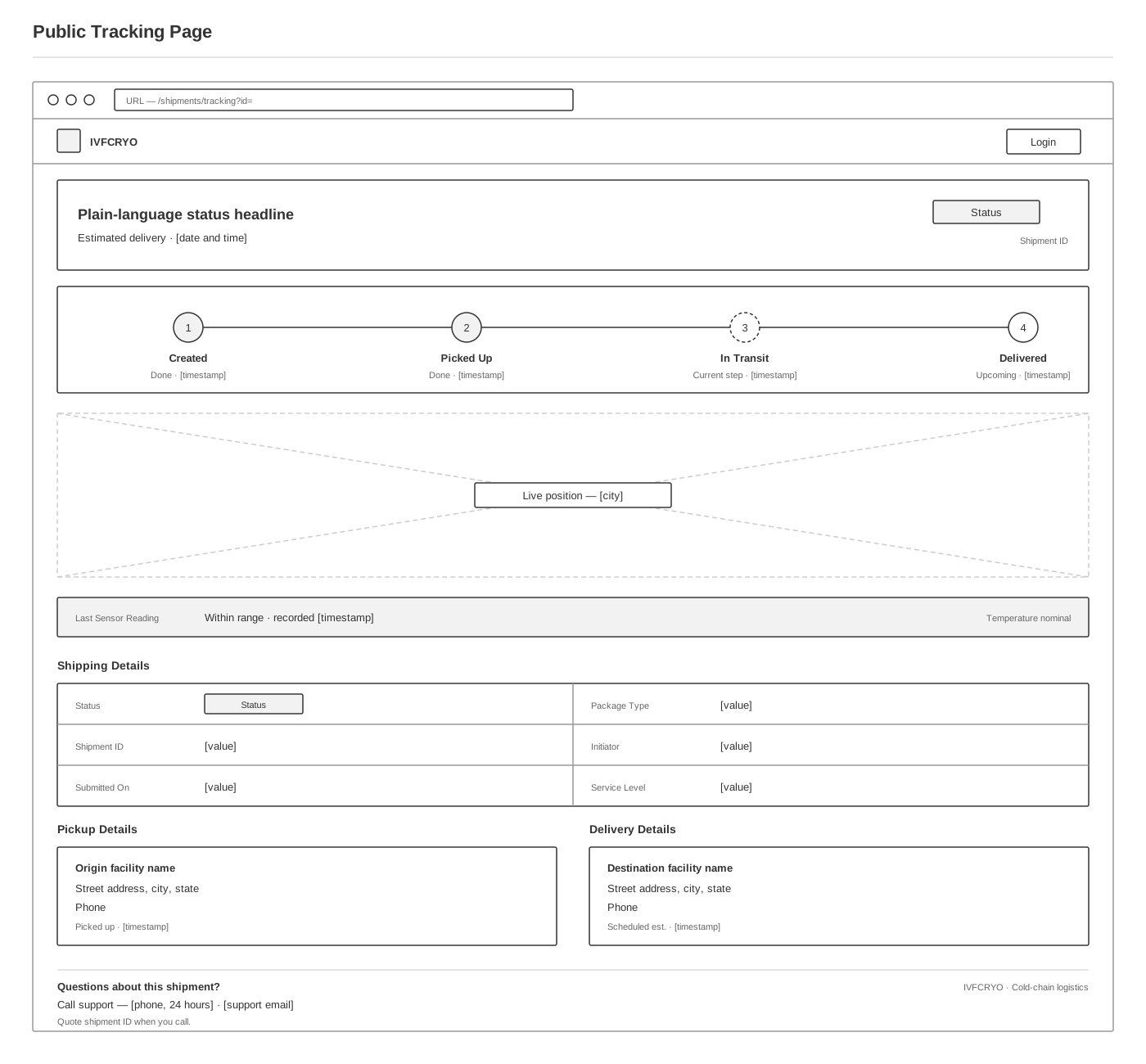
A third group never signs in at all. The receiving clinic or family gets a link by email or text, and just needs one question answered: is it still on its way. So the public page leaves out the temperature graph, which would only alarm someone who isn't trained to read it, and puts a staffed phone number in the footer instead.

The unauthenticated view sent to recipients in notification email and SMS. No account, no sidebar, no raw telemetry.
Designing for mistakes
A mistyped address or a name that doesn't match a clinic's records isn't a small form problem here, it's a risk to someone's only embryo. So every form helps people avoid mistakes, explains them clearly when they happen, and lets someone fix them without calling support. Addresses get checked against real map data, and specimen details are captured as structured fields instead of free text.
IVFCRYO's shipping guarantee, CRYO Shield, only pays out on a claim that's fully documented, so the order form also captures the declared value and protection tier, and receiving captures a temperature reading and photos right away. As Daryl put it, "the claims process begins long before a claim exists."
A legally blind customer tested the app with a screen reader from early on, and kept testing after launch, which is how the labeling issue in the limitations below got found. Status and errors always show as text and icons, never color alone, and important updates get read aloud automatically instead of only appearing silently on screen.
Error prevention and accessibility
- Structured records over free text
- Geocoded address validation
- Inline validation, recoverable errors
- Text, icon, and shape, never color alone
- Focus managed on visibility change
- Live-region status announcements
- Explicit acknowledgment at every handoff
- Immediate, structured incident capture

A form with about forty fields, split into numbered sections, with a live price, declared value, and a way forward from every error.

The highest-risk path in the product: nine sections and one submit, with validation that blocks bookings that cannot be fulfilled.
Working with engineering
The app relies on the backend to enforce its rules, such as blocking a shipment from being scheduled before everyone is ready. So I worked with the engineering team on the parts of the system the design depended on.
I turned the interview findings into the shipment stages and the readiness check the system had to enforce, mapped out where each carrier and outside service should plug in, and set the requirements for monitoring and alerts. Engineering built the backend. I built the front-end components and the specification they had to meet.
Integrations
-
IVFCRYO-Sense
GPS, internal + ambient temp, humidity, pressure
-
ShipEngine
Multi-carrier rates and labels
-
Dedicated courier
Direct medical hand-carry, no sorting hubs
-
SendGrid
Tiered email notifications
-
Twilio
SMS alerts, off-screen
-
Devise + 2FA
Auth for medical logistics
Alert levels
- Normal Within expected range. Logged, surfaced quietly, no one paged.
- Early warning A trend moving toward a threshold. Closer monitoring, a call to the courier.
- Required action A defined threshold crossed. The owner is notified and must respond.
- Emergency A critical excursion. The pre-assigned escalation path fires.
Daryl's warning drove this: "if one device frequently generates false or unhelpful notifications, employees will eventually stop trusting it." With a single alert level, people learn to ignore alerts. Four levels, each with an assigned responder, keep minor readings from looking like emergencies.
# app/models/shipment.rb — states + requirements I specced with engineering
# A shipment can't be scheduled until every party acknowledges readiness.
# That gate was the single change all three interviewees said they'd make first.
class Shipment < ApplicationRecord
# "Requested" and "provisional" are NOT "confirmed." Conflating them is what
# put couriers on the road before a clinic had released.
enum status: { draft: 0, awaiting_readiness: 1, ready: 2,
scheduled: 3, in_transit: 4, delivered: 5,
accepted: 6, closed: 7, canceled: 8 }
has_many :readiness_checks # one per responsible party
has_one :cryo_shield_coverage # declared value + protection tier
has_one :shipment_tracker # IVFCRYO-Sense: temp, GPS, humidity
has_many :sensor_readings
has_many :custody_events # named contact + acknowledgment
has_many :incidents
has_many :notifications
# Scheduling is gated, not assumed. "Sent" is not "approved."
def schedulable?
readiness_checks.all?(&:acknowledged?)
end
# Alerts are tiered so a normal fluctuation never pages like a critical
# excursion — the office team stops trusting a channel that cries wolf.
def record(reading)
sensor_readings << reading
case reading.severity # :normal, :warning, :critical
when :warning then CryoAlertJob.perform_async(id, :warning)
when :critical then CryoAlertJob.perform_async(id, :critical)
end
end
endWhat changed after launch
A patient could now see that both clinics had signed off instead of calling to ask. The office team could open one case instead of piecing it together from email, fax, and phone notes. And because scheduling waited on readiness, fewer couriers were sent before a clinic had actually released the specimens.
fewer support calls
patients and clinics got answers without phoning in
fewer shipping errors
caught before they reached a patient's specimens
How success is measured
Safety
- Temperature excursions
- Monitoring gaps
- Chain-of-custody exceptions
- Incomplete receiving records
Reliability
- On-time pickups + deliveries
- Rescheduled shipments
- Shipments started without full readiness
Efficiency
- Order-to-readiness time
- Manual follow-ups per case
- Exception resolution time
Experience
- Status inquiries
- Complaints
- Stage-appropriate updates delivered
Other screens
Annotated wireframes for six more screens, made with the same three-pass process.
-
 Landing
 -
 Auth + two-factor
 -
 Address book
 -
 Users admin
 -
 Equipment inventory
 -
 Admin settings
Testimonial

Don Fish
Owner · IVFCRYO
Josh didn't just design screens. He sat with me, our COO, and our office manager, and came back with the insight the whole rebuild turned on — the hard part is getting everyone ready, not tracking the truck. He designed the product and owned the front end, and worked shoulder-to-shoulder with our engineers on the data model and the integrations underneath. Our team runs on it, and our patients feel the difference: they finally know someone has the whole case.
Limitations
Both of these come from the same root cause: live data streaming in from more than one source, with no shared rule for timing or wording set early enough to prevent it.
-
Screen reader updates are too frequent
The tracker checks in every sixty seconds with temperature, location, humidity, and more. That is fine to look at quietly on screen. For someone using a screen reader, each update gets read aloud, and the next one starts before the last one finishes. There is a setting to slow it down, but a person has to find it first, and the fast pace is still the default. If I revisit this, I would change the default instead of just adding a setting.
-
Carriers announced with the same label
Once a shipment used more than one carrier, both got announced with identical wording. A sighted user can tell them apart by where they sit on screen. Someone using a screen reader cannot tell which carrier currently has the shipment. That only surfaced because a screen reader user tested the multi-carrier path. First thing I would fix: name each carrier explicitly in that wording.