VMSpark
Client work · Recruiting operationsRebuilding the interface without stopping the pipeline.
VMSpark processes thousands of job listings and sends them to more than a dozen hiring systems. I audited and rebuilt the admin interface in stages, preserving the pipeline and the workflows operators already knew.
- My role
- Product design and UI engineering
- Owned
- Audit, app shell, tokens, rollout
- Built with
- Rails, Stimulus, modern CSS
- 350
- page templates inventoried
- 4
- stages of rollout
- 0
- pipeline regressions
Project summary.
VMSpark pulls in thousands of job listings a day and sends them out to more than a dozen hiring systems. I owned the admin app operators used every day and investors saw in every demo, without touching the systems underneath it.
The app hadn't kept up with what it did. Buttons, forms, and tables were each built a different way on nearly every screen, so it looked more like an old prototype than the enterprise product it powered.
- The decision
- I chose the familiar layout over the more original one, since the safest way to earn trust was a pattern operators already knew.
- The result
- No pipeline problems after launch. Operators stopped noticing visual inconsistencies between screens, and leadership stopped apologizing for the app during demos.
Alternatives, implementation, and lessons
Scope and contribution
- Skills proven
-
- Design-system audit
- UI/UX design direction
- Accessible component APIs
- Frontend architecture
- Style-guide documentation
- Product decisions
- Stack
-
- Ruby on Rails
- Stimulus.js
- Design tokens
- Modern CSS
- Quality
-
- Keyboard operability
- Focus management
- ARIA semantics
- Token contrast checks
- Outcomes
-
- Zero pipeline regressions
- No operator retraining
- One token layer, app and brand
- No new JS on hot paths
My goal: make the admin app look like the modern, enterprise-grade product it already was underneath, without touching the systems, the client-specific rules, or anything an operator already knew by muscle memory. That meant owning it end to end: the audit, the decisions about what to build and what to drop, and the engineering to ship it.
Taking stock before changing anything
Sprawl this wide can't be fixed one screen at a time. Restyle the buttons on one screen and seven other button styles are still waiting elsewhere, with no way to know you've found them all. So before changing a single style, I wrote down everything I found: a full inventory covering every one of the 350 page templates in the app.
That inventory worked as a map. It showed me which problems were easy fixes, which needed a real architectural decision, and which were outside the scope of the redesign entirely. Most of it was the same interaction built a dozen different ways across the app.
ERB templates inventoried
button styles, one concept
form-element styles
views bypassing the tokens
A few of the findings
Button styles competing for attention
Primary, secondary, danger, and ghost variants, each implemented two or three different ways. Some leaned on Bootstrap utility classes, others on per-view custom CSS, a few were inline-styled anchors pretending to be buttons. A Save on one screen didn’t match a Save two clicks away.
Form element styles, all at once
Plain Rails helpers sat next to Bootstrap form-control inputs, Select2 widgets, and hand-rolled dropdowns. Border radius, padding, focus rings, and disabled treatments all diverged. The same concept (pick one from a list) rendered five different ways across the app.
Form-rendering patterns, coexisting
form_with(model:), legacy form_for, form_with(url:), bare <form> + HTMX, and HTMX-only with hx-include.
Tables with no shared convention
Row striping in some, not in others. Headers styled four ways: dark fill, light fill, borderless, and all-caps. Pagination rendered with Kaminari on one screen and a bespoke HTMX block on the next. Density jumped from compressed to roomy between adjacent views with no underlying logic.
Labeling strategies, all coexisting
Sentence case, Title Case, ALL CAPS, and placeholder-as-label all appeared across the app. Required indicators were sometimes asterisks, sometimes parenthetical (required), sometimes absent. The same field concept carried different names on different screens (Bill Rate, Rate, Pay Rate).
Views bypassing the token system
A semantic color-token system already existed in _color_tokens.scss, but dozens of views bypassed it with inline styles, hardcoded hex literals, and raw colors in view-level <style> blocks.
Dead code in production
A zero-byte _empty.html.erb, an X-prefixed dead index file (101 lines), an ASDKAJSHDJHASD debug string committed to production, and a sticky table header with hardcoded background-color: red from an abandoned debug session.
What the sprawl actually looked like
Four screens pulled from the same app, on the same day. Each one makes its own decisions about buttons, inputs, labels, and tables. None of them agree with the others.
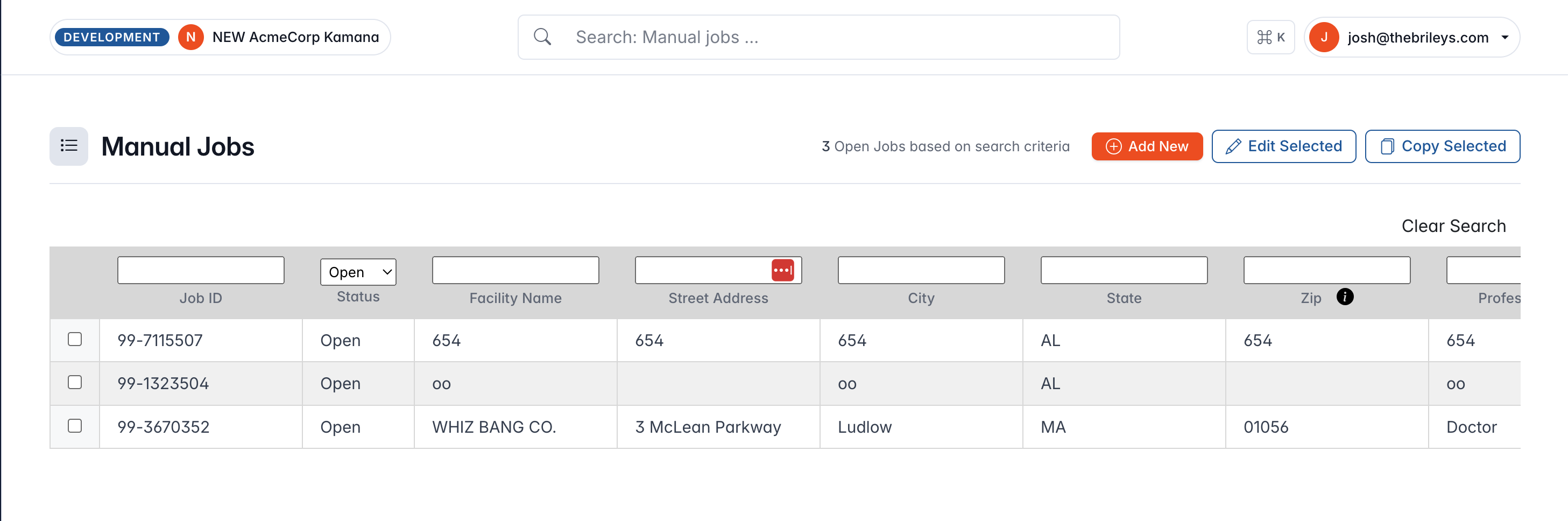

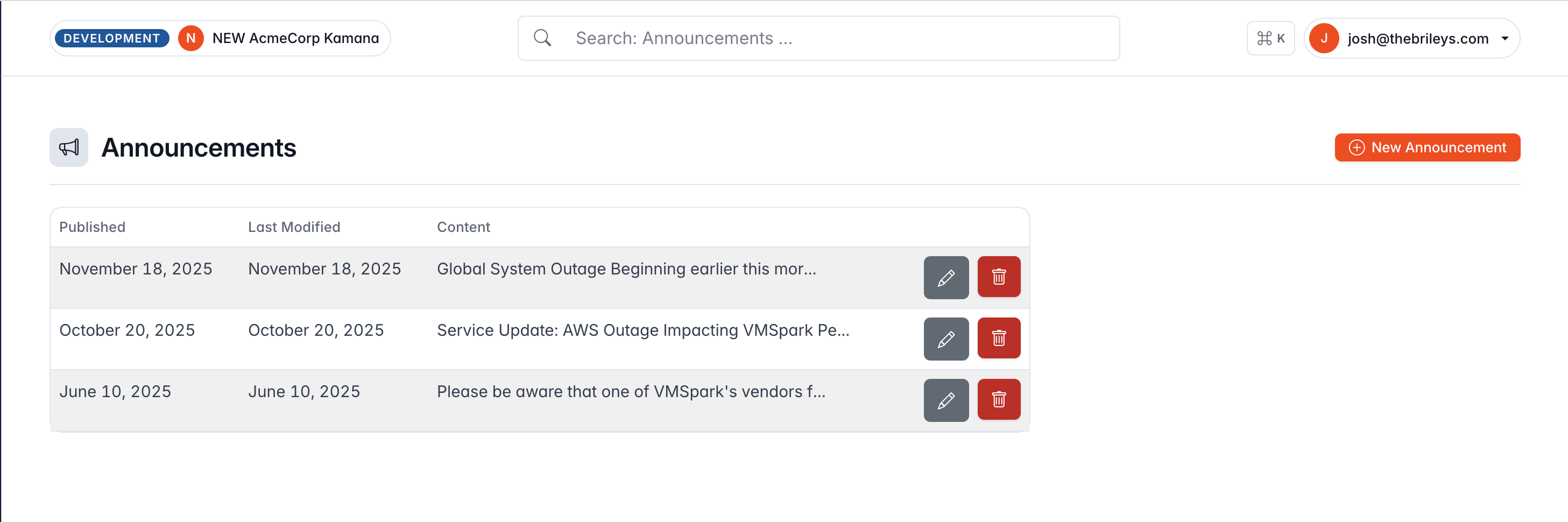
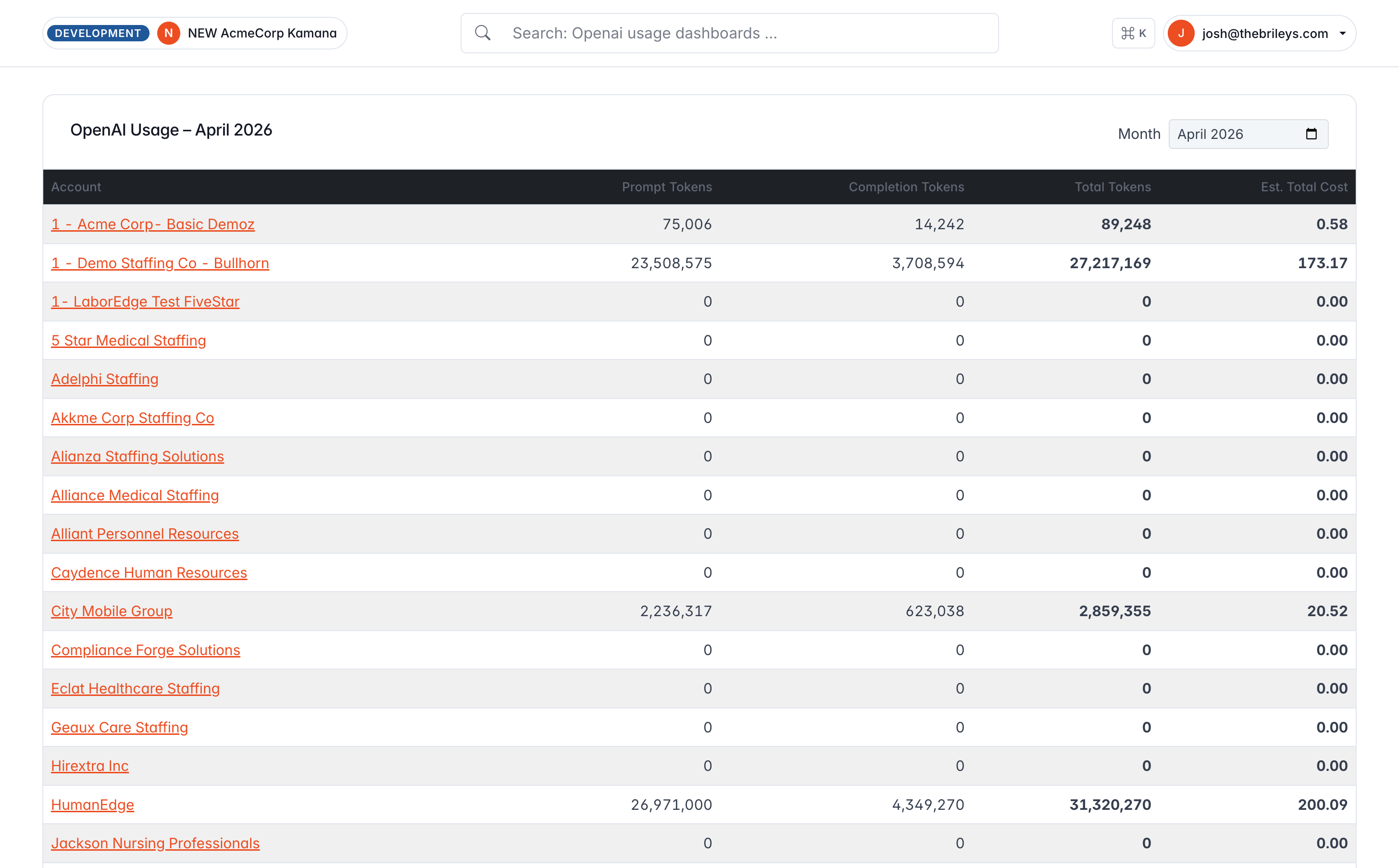
The inventory is what made a real fix possible instead of a screen-by-screen patch. Each finding above resolved to one decision, made once, and applied everywhere it was needed.
Choosing a direction
I wrote up three possible directions, each with its own honest tradeoffs, instead of just picking one. Writing the options down made the choice easy to question later, based on evidence rather than taste.
Dense · Keyboard-first
56 px icon rail, tight 13/14 px type, hairline borders,
⌘K palette as the centerpiece,
orange reserved for exactly one thing per screen.
Signals “scales to power users.”
Chosen
Enterprise-familiar
48 px product rail plus 260 px project nav, the real two-tier pattern. App-switcher waffle, breadcrumbed page headers, right-side inspector panel. Brand orange on active rail state, soft navy-tinted elevation.
Every enterprise buyer has used this pattern before.
Spacious · Document-forward
270 px soft sidebar, no persistent top bar,
⌘K by shortcut only, generous spacing.
Risk: reads as lightweight for a dense ops tool.
I chose B. C looked nicer, and A was more sophisticated, but operators worked across many client accounts every day, and the safest way to earn their trust was a layout they'd already used at other jobs.
I also dropped a feature I'd originally planned: a global "Create" button. Most listings arrive automatically from the incoming data feed, so people rarely create one by hand. Adding the button would have copied a familiar pattern that didn't actually fit here.
Familiarity beat novelty here. Operators had already seen this layout, at other jobs.
Rolling it out in stages
This was a live product with operators in it every working day, so an all-at-once redesign that broke their muscle memory was never on the table. Each phase below could ship on its own, and could be safely rolled back without undoing the phase before it.
Phase 1 · Baseline
Visual baseline
Built one reusable page-header component that every screen could use for its title, tabs, and buttons, then quietly rolled it out across roughly 30 existing pages without anyone needing to touch each page by hand. Also added a badge in the top bar showing which environment and which client account you're in, so it's obvious at a glance.
Phase 2 · The shell
Two-tier shell
Replaced one large, always-open sidebar with a slim icon rail plus a second panel that automatically shows the options relevant to whatever section you're in. Crucially, the page already knows which section is highlighted the instant it loads. There's no flash or delay while extra code figures that out afterward.
Phase 3 · ⌘K
Command palette
A search box you can summon from anywhere with a keyboard shortcut, scoped to whichever client account you're currently working in, with results grouped into categories (custom rules, rate plans, facilities, accounts, jump-to) and updating smoothly as you type. Deliberate constraint: the palette does not replace the search box already on each page. It's an extra option, not a replacement.
Phase 4 · Polish
Density, shortcuts, inspector
- A compact-or-roomy layout setting, saved to your account and applied before the page even finishes loading, so there's no visible jump.
- A shortcut cheat-sheet (press "?") that only appears when you're not currently typing in a form field.
- A slide-out detail panel built to match the look and feel of the rest of the app.
- Loading placeholders that respect a visitor's "reduce motion" setting, so they don't shimmer or pulse for anyone who's asked their device to limit animation.
What it looks like now
A style guide that ships with the app
Buttons collapsed down to one consistent style instead of eight competing ones. Forms, tables, and labels all moved onto the same shared building blocks. All of it lives in a style guide that ships with the app, so the next person to build a screen inherits those decisions instead of reinventing them.
Plate 01
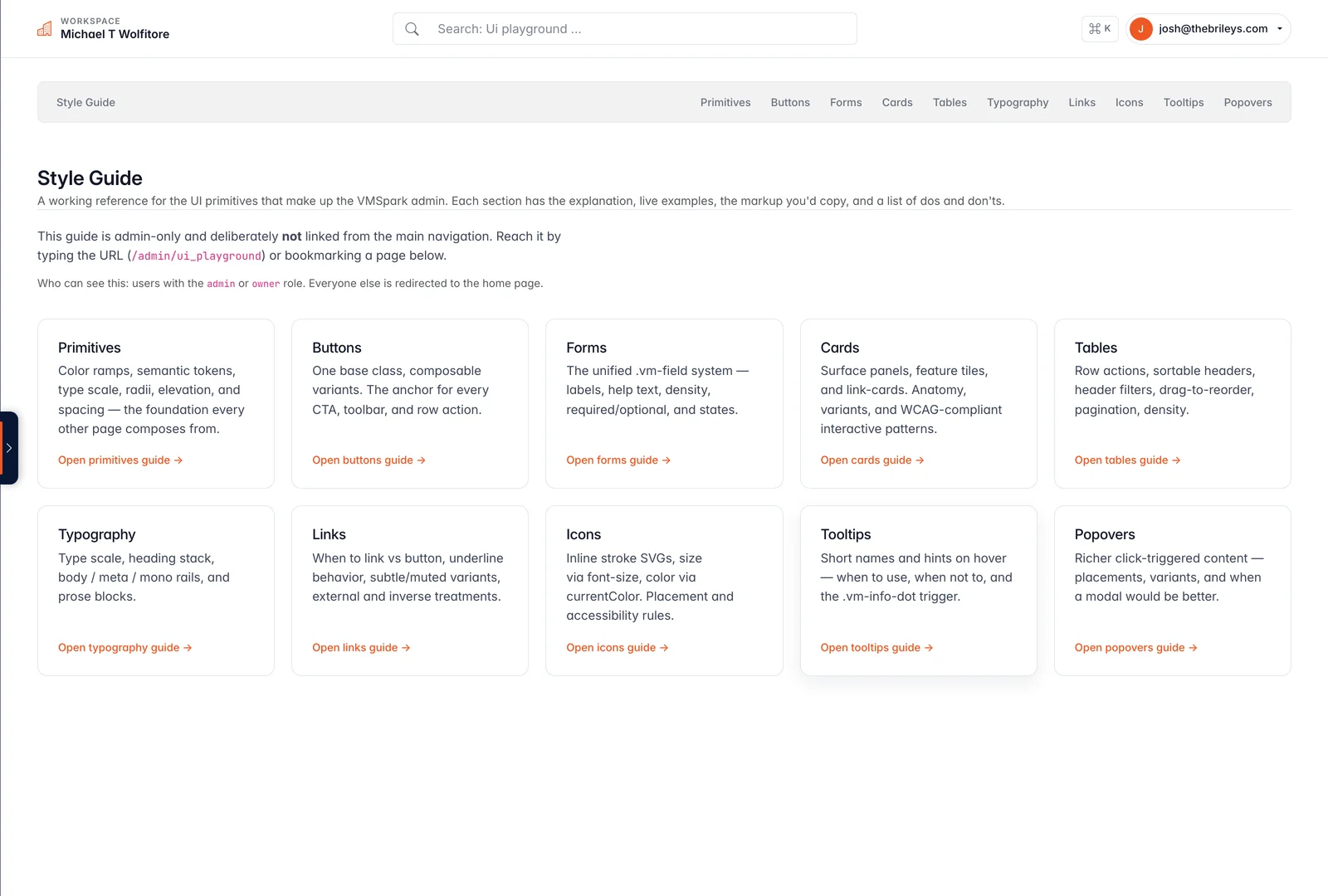
The admin-only style guide: every building block, button, table, and form pattern documented in one place.
Plate 02
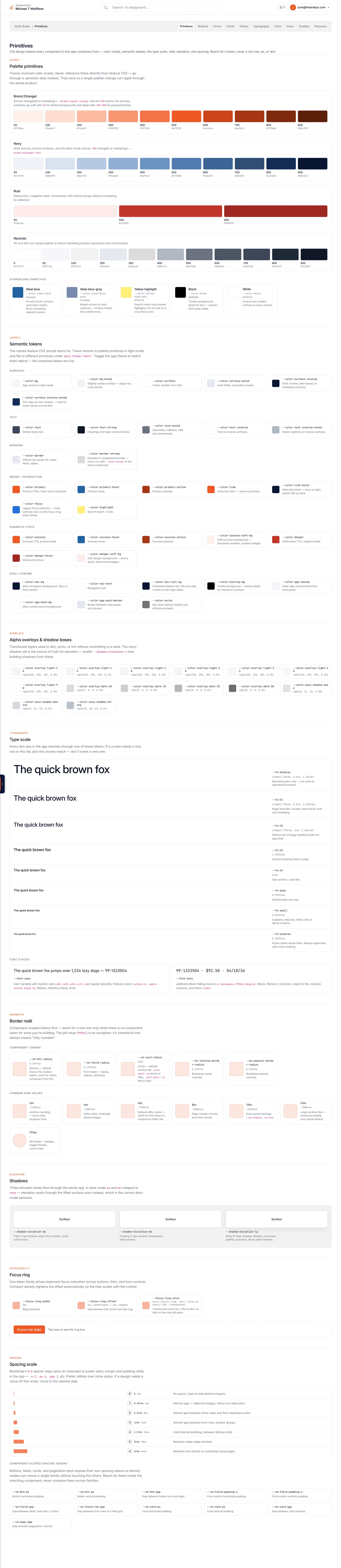
Color, type, spacing, and shadow depth: the basic building blocks every screen now draws from.
Plate 03
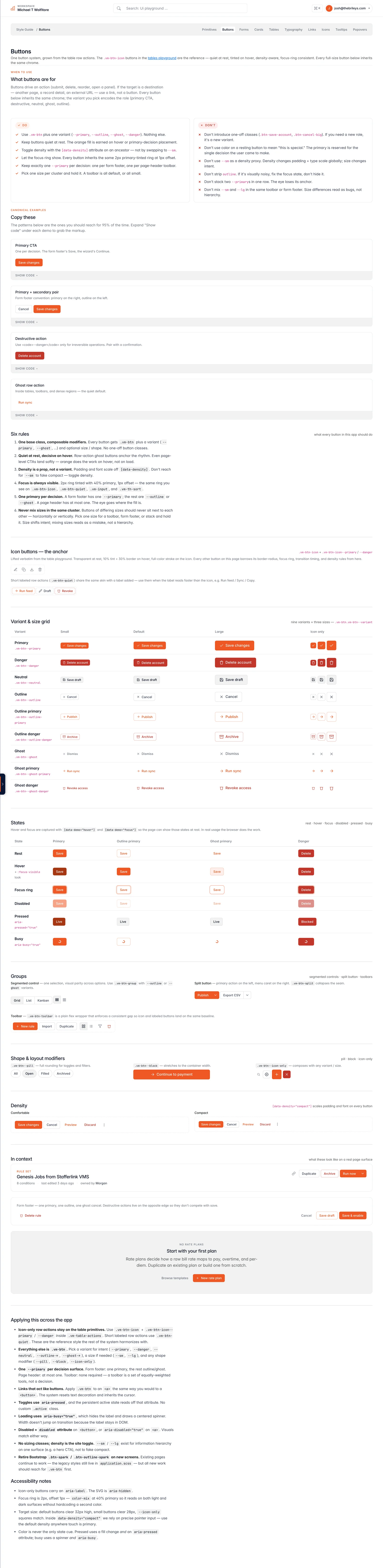
The eight-plus button styles from the audit, resolved into one consistent set covering every type, size, and state.
Plate 04

One header style, one spacing rule, one page-navigation control, standardized across every table.
Screens and flows
What actually got built
Eleven screens and five flows, with the reasoning written onto each one. These are reconstructions, drawn afterward to document the decisions.
How a screen got built
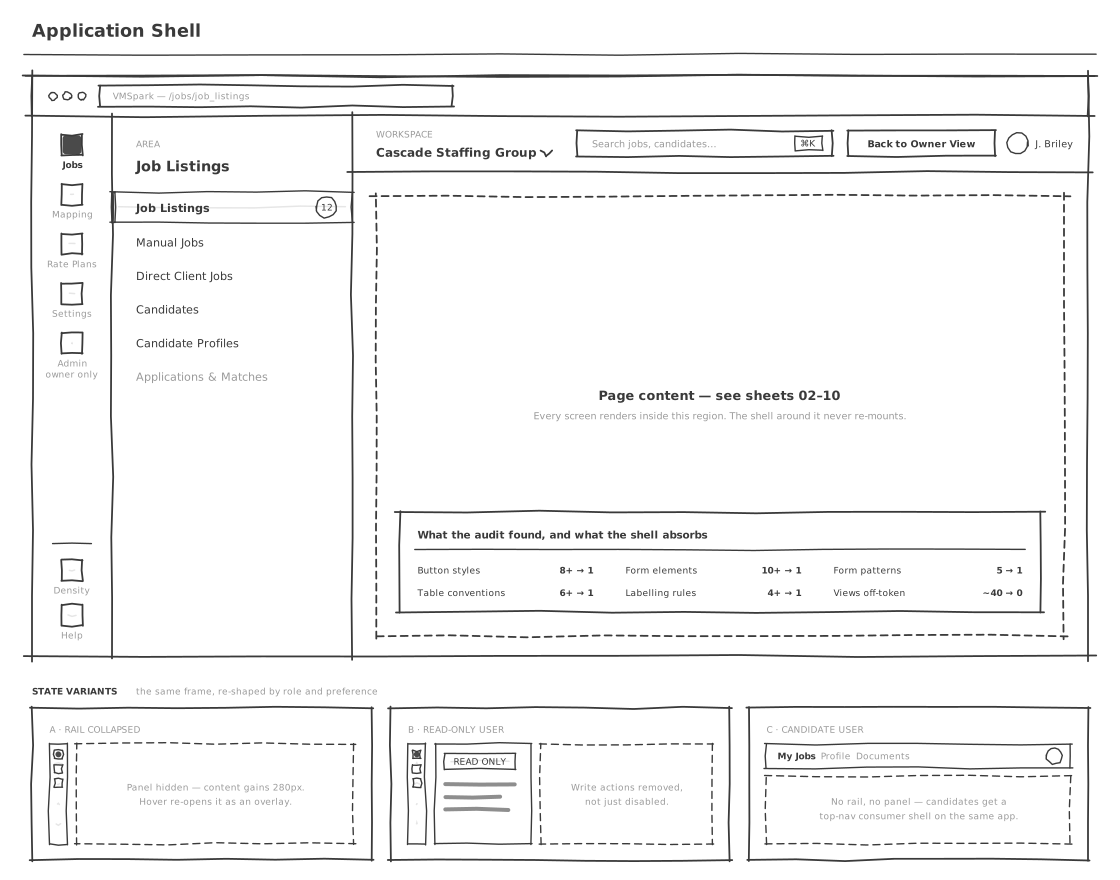
Sketch
Exploring the layout.
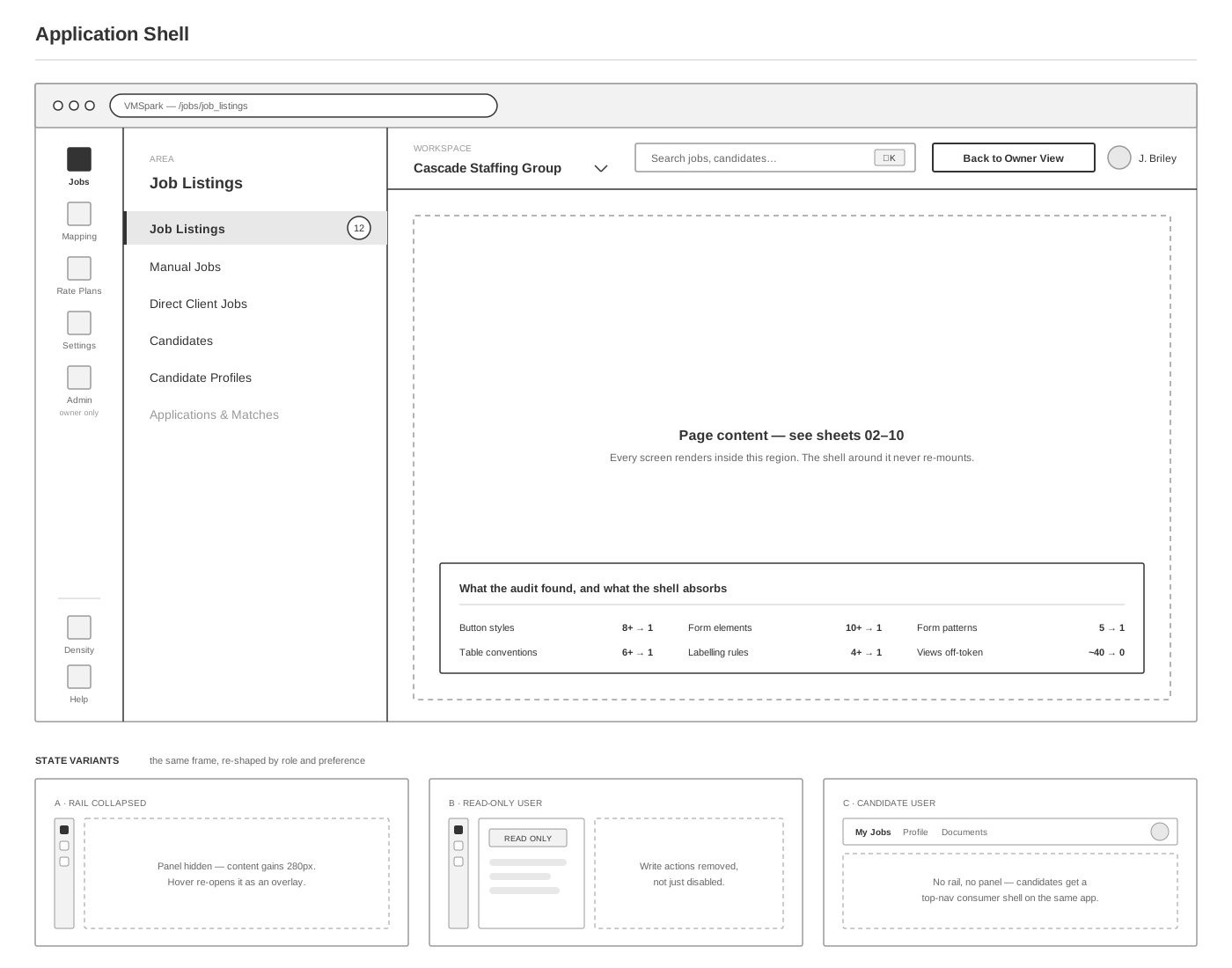
Wireframe
Defining the behavior.

Annotated
Documenting the decisions.

One shell applied to every authenticated screen. The sprawl came from every view having somewhere of its own to decide.

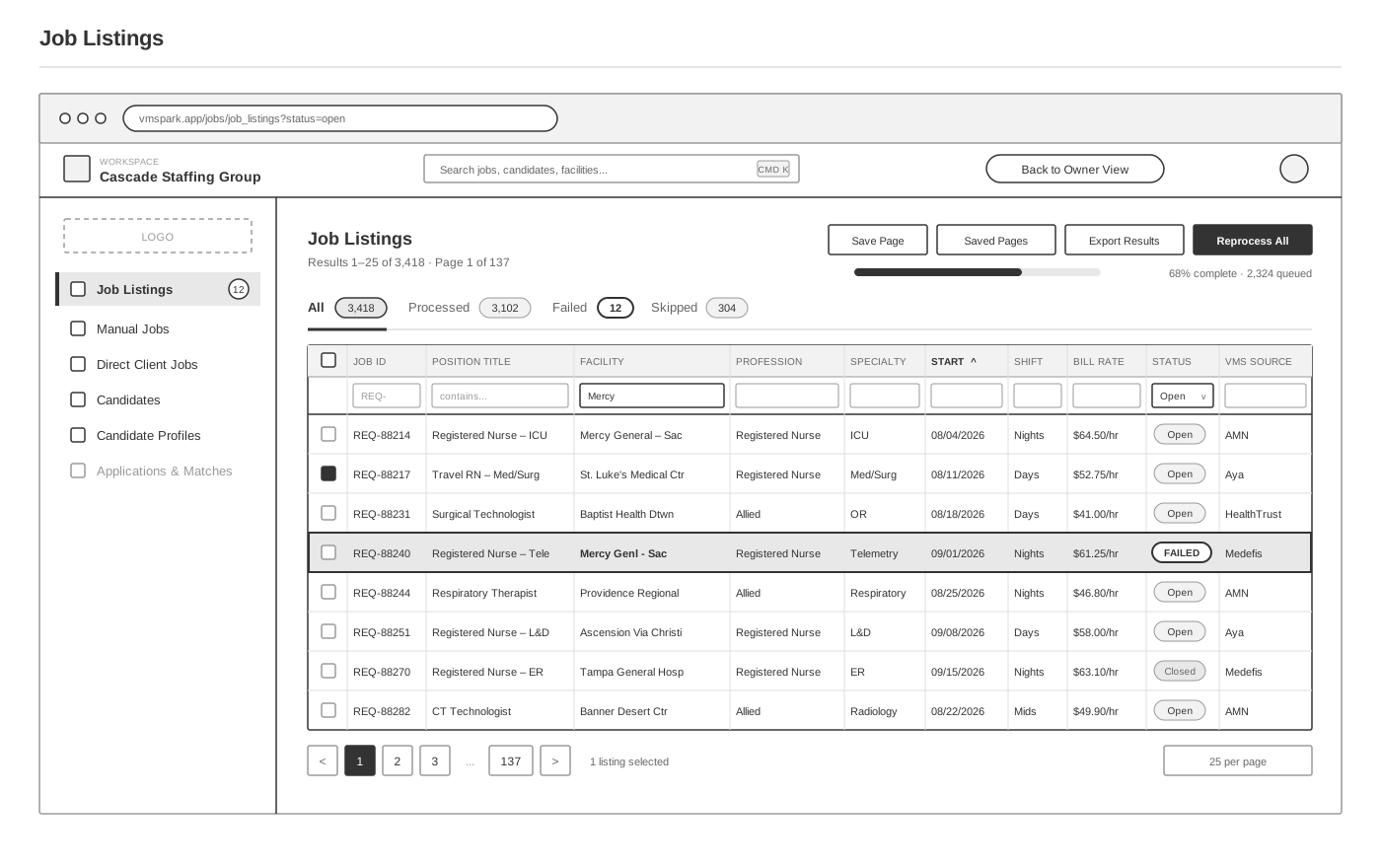
The primary triage surface. Status is a tab count, and a failed row stays in the list rather than being exiled to another screen.

Why one listing ended up in the state it did. Raw payload beside mapped result, so a failure is self-explaining rather than a support ticket.

The operational center. Unmapped values are a revenue problem, not a tidiness problem, so the queue is built to visibly empty.
The rest of the system
Seven more screens, ending with the inventory that replaced eight button styles, ten form styles, and six table conventions with one of each.
-
 Custom rules
 -
 Candidate profiles
 -
 Applications & matches
 -
 Settings
 -
 Candidate portal
 -
 AI usage
 -
 The design system
User flows
Five flows covering the paths the screens sit on, each one splitting what a person does from what the system does with it.

The pipeline the redesign was forbidden from touching. Processed, failed and skipped are all first-class outcomes.

What an operator does to clear one unmapped facility, and what that single save costs downstream.

Per-account rules as the escape hatch that keeps client special cases out of a shared pipeline.

The system proposes, a recruiter disposes. Submission is the only externally visible step, so it is the only one that asks.

Three people with opposite needs, one shell, and a mapping queue upstream of all of them.
What changed after launch
None of the systems underneath changed: the pipeline, the client-specific rules, the connections to outside recruiting systems. A user who logged in the day the new version went live saw their data and their workflows intact, just inside a shell that finally looked current. Operators stopped noticing visual inconsistency between screens, and leadership stopped apologizing for the app in investor demos.
Zero pipeline regressions
No regressions reported against the ingest or fan-out paths after cutover.
Operator confidence
Operators use a tool that looks like one product, not ten. The UI stopped fighting them at every screen.
Investor confidence
Demos open with the product, not with caveats about the surface it lives on.
No new JS on hot paths
Palette and inspector load on demand. First paint got lighter, not heavier.
A detail worth calling out
Aligning the app with the marketing site
Partway through phase two, I pointed the admin app's color system at the same five brand colors already used on the public website, instead of its own separate set. Every screen that used that system picked up the new look automatically. Two small details carried over on purpose: the main button turns steel blue on hover instead of just getting darker, and a link goes nearly black, matching how the website already behaved.
What Jon said

Jon Sturm
Director of Product & Customer Success · VMSpark
Josh inventoried 350 ERB templates before writing a line of new CSS, then turned that audit into a phased rollout we could ship behind no flags. The shell finally reads like the enterprise product the pipeline always was, and operators didn't lose a single piece of muscle memory in the move.
The edges
Both of these are the kind of problem a page-by-page review, done by hand, is likely to miss: patterns that only show up when you interact with something, not on a screen you can just look at.
-
Pop-up windows the inventory missed
The audit counted button styles, forms, and tables because those repeat across screens you can scan by eye. Pop-up windows don’t: each one only appears when triggered. Every pop-up in the app turned out to be built a different way, with its own custom code. Tooltips had the same problem. Both got folded into the rebuild, but neither showed up in the original inventory.
-
Finding the rest took a tool, not just eyes
A manual pass through 350 page templates finds the patterns that repeat often enough to notice, but misses a one-off pop-up or an abandoned approach hiding in a screen nobody opens often. I built a small tool that scans the app for what each piece of the interface is trying to do, rather than just its code, and that's what actually found the dialogs and tooltips the manual audit missed. Next audit, that tool runs first.