Logatot
Product work · Home child careHelping child care providers log their day by voice.
Providers can record meals, naps, and attendance while caring for children. I led front-end work on a three-developer team, connecting voice interactions, recoverable errors, and shared components in a paid product.
- My role
- Lead front end and interaction design
- Built with
- Rails, ViewComponents, Alpine
- Team
- Three developers
- 2+ hrs
- saved on daily data entryReported by one provider
- 21
- reusable ViewComponentsAcross nine namespaces
Project summary.
Three separate provider interviews all pointed to the same problem: a job that demands constant attention leaves no time for paperwork, so providers filled it in from memory at night, and those memory-based records were the ones inspectors and food-program auditors cared about most.
- The decision
- I chose matching against a known list in the moment, and using AI to prepare ahead of time instead. A record someone might use to check compliance can't afford a confident guess.
- The result
- One provider said she saved over two hours a day on paperwork. Attendance, meal, and safety records now come from the same entries logged during the day, so reviewing them takes minutes instead of an evening.
Alternatives, implementation, and lessons
Scope and results
- Product design
-
- Voice-first interaction design
- Two-sided information architecture
- Failure and repair flows
- Print-first compliance documents
- Fifteen annotated design sheets
- Engineering
-
- 21-module design-system helper layer
- 21 ViewComponents, 9 namespaces
- HTMX + 74 Alpine islands
- Rails 7.1 domain, 51 tables
- Deterministic voice parser
- Platform
-
- Picovoice Porcupine (on-device)
- Web Speech API
- OpenAI phonetic aliases
- Pusher real-time
- Stripe + association billing
- Contribution
-
- Lead front-end on a 3-dev team
- ~1,100 of 1,939 commits
- English + Spanish at parity
- Shipped as a paid product
- Sold direct and via associations
Who the app is for
A home daycare provider is one person: caregiver, cook, and record-keeper, often holding a toddler through a twelve-hour day. She also has to answer to three separate sets of rules, all reflected in how the app is built.
None of those rules get followed at a desk, so the paperwork used to happen after the fact, at 8pm, from memory. The whole app exists to move that record-keeping into the moment, hands-free, so the required records come from those entries instead of being written up later.
Three sets of rules
-
CACFP
The federal food program reimburses a meal only if it met component requirements for the child’s age group, and only if you can prove it.
-
State licensing
Signed attendance records, fire drill and shelter-in-place logs, allergy and medication rosters.
-
Tax
The IRS home-daycare time-space percentage, which needs both business hours and the square footage used for them.
Problems with logging from memory
-
Memory isn’t reliable
A nap logged from memory at 8pm is a guess, and so is a diaper change. The records that matter most legally are the least accurate ones.
-
It wears providers down
Many providers leave this work because of the paperwork. The goal was to give them their evenings back.
-
Problems surface too late
Finding out at month end that a lunch was missing a vegetable is too late to do anything about it.
Four types of users
-
The provider
The primary user and the hardest to design for: on a phone, often one-handed, and interrupted all through a twelve-hour day.
-
Parents
Use the app about a dozen times a year, usually on a phone at pickup time, so they sign in with an email link instead of a password.
-
Authorized pickups
Each has their own PIN and their own list of children they can pick up, so the app enforces custody rules.
-
Employees
In accounts with staff, employees clock in and out through the same event log as everything else.
All four sign in through the same account system, which attaches each person's role, such as employee or authorized pickup, to their account.
Talking to providers first
Before any screen on this page existed, I interviewed three home-based providers separately: Angie, Deborah, and Yari. I also talked with the administrators who process food-program reimbursements, and with childcare influencers who talk to that audience online.
All three providers, without hearing each other, described the same problem: watching children all day leaves no attention left for the paperwork it also requires. And they described the same fix: capture it by voice in the moment, then review it later, instead of trying to remember it at night. That's what the Voiceboard and the review queue described below are built around.
Changes from the research calls
-
Accents were getting misheard
The transcription tool wasn’t trained on the range of accents providers actually speak with, so words came through wrong before the app ever tried to understand them. That’s why the app now keeps a list of likely mishearings for each child’s name, instead of trusting the raw transcript.
-
Providers needed better proof for claims
The people who process food-program reimbursements pointed out gaps in what the app gave providers to back up a claim, which changed both the reporting and the screens built on top of it.
“I would want to review it. Names can be difficult. A system may misunderstand a child’s name or a Spanish word. It should show me what it heard and let me approve or correct it.”
Source interviews, lightly edited for length: Angie, Deborah, Yari, and the cross-interview theme analysis.
Provider and parent views
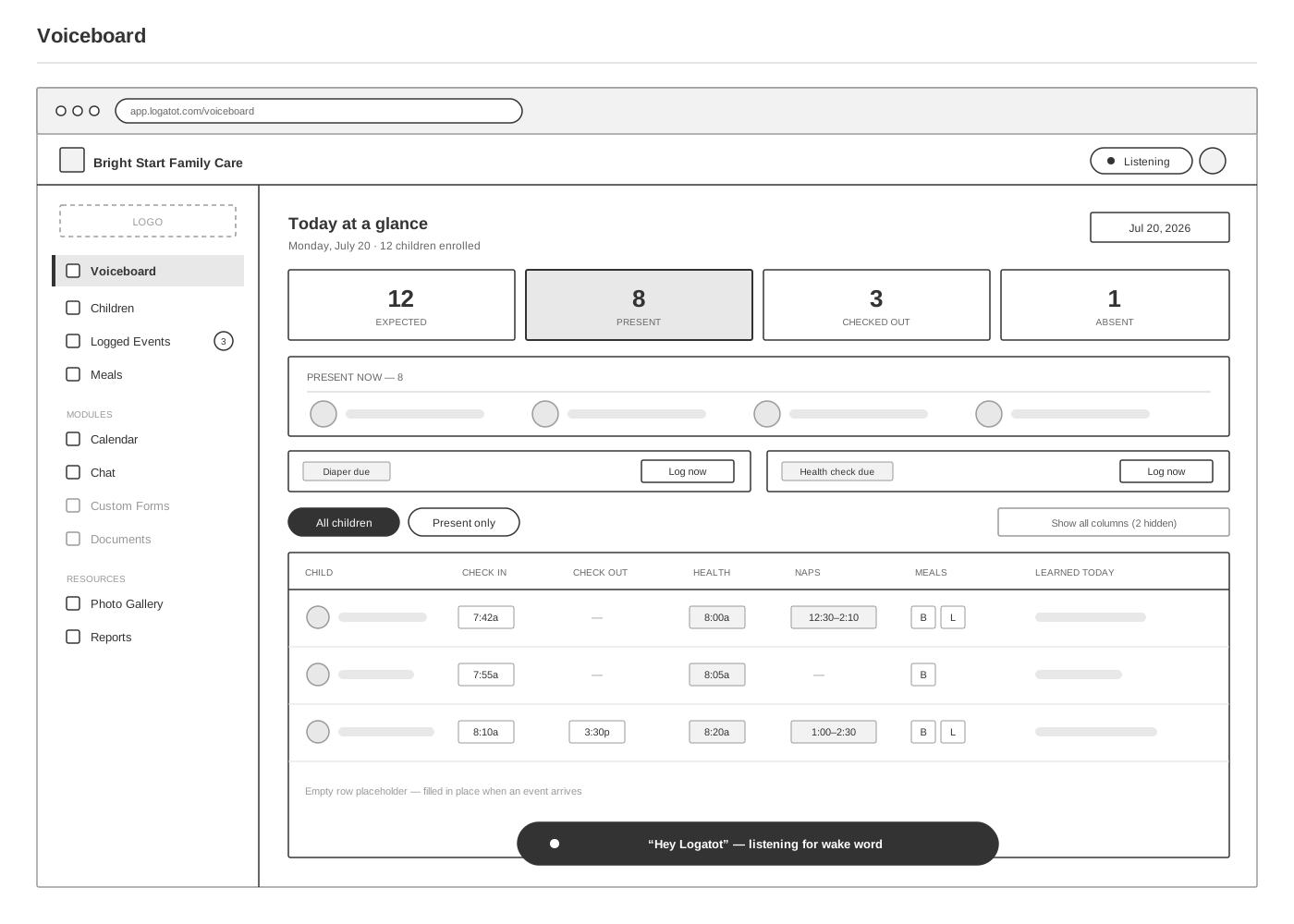
The main screen is the Voiceboard: one row per child, one column per event type, for a single day. A provider scanning twelve children needs the rows to scroll left and right together, so they stay lined up on the same point in time. Otherwise each row scrolls on its own and the times stop lining up.
How these sheets were made
Every screen went through three passes: a rough sketch to work out the shape, a clean wireframe to fix it, and that same wireframe with the reasoning written onto it. The decisions themselves came from the provider calls described above, made while the app was being built. The sheets were drawn afterward, to document that reasoning for this case study.
From sketch to annotated wireframe
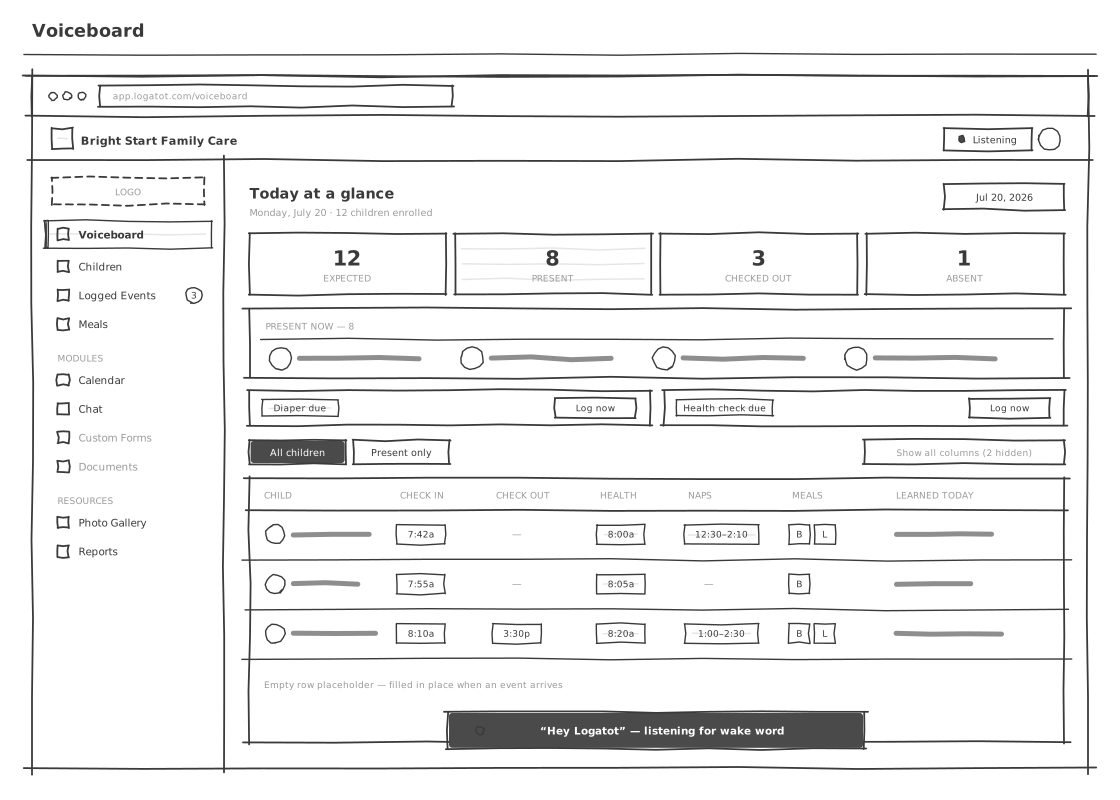
Sketch
Exploring the layout.
Wireframe
Defining the behavior.

Annotated
Documenting the decisions.

One row per child and one column per event type for a single day, laid out as a grid so a provider can scan twelve children at once.
The parent portal shows exactly the same events as a timeline: time down the left, one child at a time. The provider is scanning twelve children at once, so the provider gets a grid. A parent is reading about one child in order, so the parent gets a chronology. The only thing a parent can send from the portal is a message to the provider, because every extra way to submit something would be one more thing for the provider to handle during the day.

The same events as the Voiceboard, shown as a timeline for one child. Messaging the provider is the only action parents can take.
Underneath both views, whether a child is checked in isn't stored as a simple yes-or-no flag. It's worked out fresh each time from the full history of check-ins and check-outs, so it can never drift out of sync with what actually happened, no matter which of the ways a check gets logged, voice, tablet, or the shared board. A wrong headcount is a licensing problem, so it was worth the extra work.
System-level decisions
- Rows scroll horizontally in sync
- Attendance calculated from check-in history
- Enrolment status derived from dates
- Deleted records are hidden and kept
- Column visibility per device, persistent
- Empty rows pre-rendered for live updates
# app/models/logged_event.rb
# Voice, kiosk, board, and API all write here, so this is the only
# record all four already agree on. Attendance is read, not stored.
class LoggedEvent < ApplicationRecord
enum status: { processed: 0, pending: 1, failed: 2, unknown: 3 }
belongs_to :child, optional: true # a failed parse may match no one
has_one_attached :audio # kept, so a human can repair it
# A parse that fails is written, not dropped. The diagnostics say
# which half broke; the raw utterance is what the repair screen
# renders as tappable word chips.
scope :needs_repair, -> { where(status: :failed) }
# occurred_at is the SPOKEN time, not the processed time, so a
# batch logged at 3pm still reads accurately in a parent's feed.
def self.attendance_for(child, date)
where(child:, occurred_on: date)
.where(event_type: %i[check_in check_out absent])
.order(:occurred_at)
.last&.event_type || :expected
end
endHanding the tablet to a parent
Check-in is the one moment the provider's own tablet leaves her hands. Kiosk mode signs the provider out completely first, so a parent holding the tablet has nowhere to go and no record to reach besides their own child's. Parents sign in with a link sent to their email instead of a password, since most families only use the app a dozen times a year.

Handing over the tablet signs the provider out, so a parent can only reach their own child’s check-in.

Handing the tablet to a parent and taking it back, with the session torn down in between.

Parents sign in with an email link, and a daily summary email brings them back to the portal.
Fixing misheard entries
When the app can't understand what was said, it saves the attempt instead of throwing it away, along with the raw words, a translation, and the recording. A badge shows how many are waiting for review.
On the review screen, the words appear as clickable chips. Tapping the one that was the child's name teaches the app that name, and the same mishearing gets recognized correctly every time after.
The app also shows what it partly understood instead of discarding it, so a provider only fills in the missing piece. And instead of announcing a failure out loud in a room full of children, the spoken reply just says “processing unknown event for unrecognized child”, while it waits for review.

Failed voice entries, shown as tappable word chips. Picking the right word adds it to that child’s list of name variants.
We couldn’t spot the child’s name in this event. Help us by selecting a word below that sounds like the name. If there’s no match, no worries, just ignore this step!
How voice recognition works
A wake-word detector runs directly on the device, always listening for "log a tot", so no audio ever leaves the device just to hear that phrase. With a live microphone in a room full of other people's children, that was the first question every provider asked.
Turning speech into a saved record runs on a fixed set of rules, with no AI guessing in that step. What's said is checked against a list of known phrases, and names are matched against the class roster. An AI model making that call live would be slower and could confidently guess wrong, logging a nap that never happened. The rule-based system either finds a match or sends it to a person to review, and a non-match is an expected outcome.
AI is used earlier instead. When a child is added, it generates a list of ways that name is likely to be mispronounced or misheard, and the app checks new recordings against that list. Toddler names are short and similar to each other, so getting them right is the app's hardest problem. Corrections a provider makes in the review queue get added to that same list, so the system keeps improving.
Spanish speech gets translated to English before the app tries to match it, so one set of phrases covers both languages. A single child mentioned updates the screen right away; several children at once take a moment longer in the background, so the response never slows down.

From spoken words to a saved event, including the path for entries that fail, drawn in the same detail as the path that succeeds.
Services
-
Picovoice Porcupine
Custom wake word, WebAssembly, on-device
-
Web Speech API
Transcription, silence-timer endpointing
-
OpenAI
Phonetic name variants, at child creation
-
Pusher
Per-account channels for live board updates
-
Sidekiq
29 jobs, 4 scheduled reminder workers
-
Stripe + union API
Direct billing and association membership
Accessibility and Spanish support
Voice helps a provider holding a child, and it helps anyone who can't comfortably type mid-task. But it can't be voice-only: everything capturable by speech can also be entered by hand, so a failed recognition always has a manual way through. Every button shows a visible outline when focused with a keyboard, status changes get read aloud to a screen reader as they happen, and printed reports always come out in plain black text, even if the provider's screen is set to dark mode.
Translation goes further than swapping button labels, because Yari said so directly in her interview: “A translated button is not enough. We need the instructions, warnings, support, and official documents to be clear too.” English and Spanish are fully supported, including instructions, warnings, and official documents, and Spanish speech is translated before the app tries to match it against a known phrase.
What changed for providers
Attendance records, signed releases, food-program claims, and safety logs now come from events captured during the day, so month end is a quick review instead of an evening of catching up. The app shipped as a paid product, sold directly and through child care associations.
less data entry per day
reported by a provider association president
of the project's 1,939 commits
lead front-end on a three-developer team

New providers are most likely to give up while the board is still empty, so CSV import sits next to "Add child" instead of in settings.

Plan a menu, serve it, and claim it. Menus are checked against food-program rules while they are planned, when a mistake is still easy to fix.
Other screens
Annotated wireframes for six more screens: the children roster, the child record, the CACFP menu planner, the calendar and fire drills, printable reports, and the dashboard for providers who enter events by hand.
-
 Children roster
 -
 Child record
 -
 CACFP menu planner
 -
 Calendar and drills
 -
 Reports
 -
 Manual-entry dashboard
Testimonials
It is truly remarkable to be completing a physical task and talking to the voice assistant to record it simultaneously! Now I do not have to do my data entry outside of business hours. Each day I am saving over 2 hours on data entry!!!
President
CSEA/VOICE Local 100A
I never realized how much time I had to spend filling in paperwork until I didn’t have to. Logatot has given me my evenings back.
Margaret Balko
Home-based provider
Limitations
Keyboard focus works well everywhere in the app, but the Voiceboard’s screen-reader support didn’t keep pace with how complex that screen got. These are the four I would work on first.
-
Screen-reader support on the busiest screen
The Voiceboard’s expand and collapse controls don’t announce their state to a screen reader the way the rest of the app does. That pattern is built correctly everywhere else and didn’t make it into the hardest screen. First thing I would fix.
-
No tablet layout
The layout switches at one single screen-width cutoff, which leaves anything in between phone-size and desktop-size, a tablet, poorly served. That matters more here, because the kiosk is a tablet.
-
Recurring time zone bugs
Most of the recent updates to this project were fixes to how it handles time zones. I contained the problem but never fully solved it.
-
No offline mode
The pieces needed for the app to work without internet exist but were never fully finished. For tablets in homes with unreliable WiFi, that’s the highest-value thing that isn’t built.